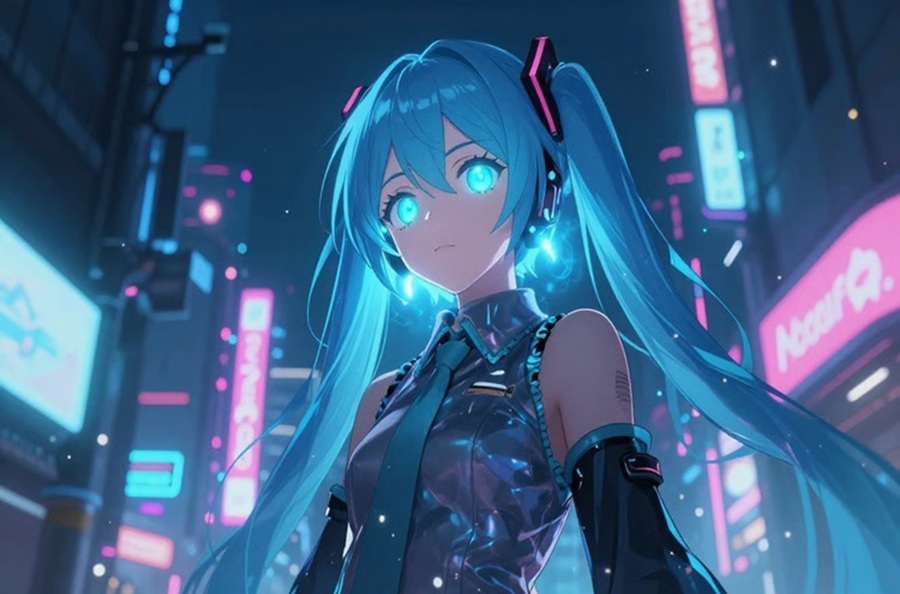
Today’s creators want AI tools to be fast, but also high quality and creative. Quick turnaround means precious time, and adaptable workflows cater to various creative objectives and manufacturing processes. Framia Pro brings both benefits together in a single creative space, enabling users to transition from conception to downloadable artwork seamlessly. This guide will give you great insight into how anime creation can be efficient, what the key features are, and how you can get anime images ready with minimum work.
What Makes an AI Anime Generator Fast and Efficient
The ability to create anime quickly is essential for intelligent processing, optimized workflow and reduced manual effort. The sophisticated AI models in Framia Pro enable rapid image generation by swiftly understanding intricate prompts and reference images. Its optimized generation pipeline ensures minimal waiting time and consistent visual quality. Conversational editing also makes revisions easier as it eliminates repetitive manual edits in the form of natural language.
Several AI models are available to support, enabling creators to align with their artistic objectives without switching platforms. The streamlined workflow minimizes disruptions, boosts productivity, and enables creative concepts to be transformed into finished artwork in a significantly shorter timeframe than conventional illustration techniques.
Flexible Creative Options Available in Framia Pro
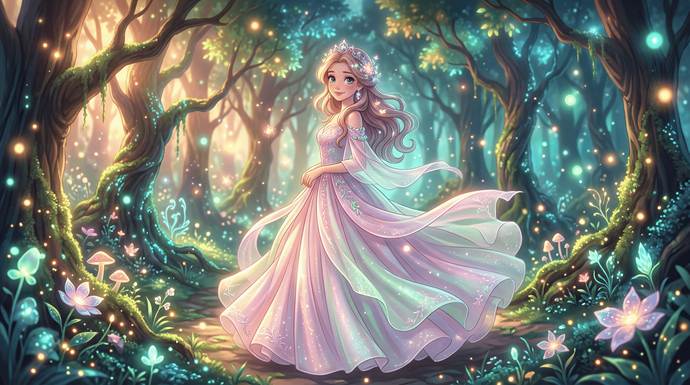
Creative flexibility helps artists to experiment with a variety of visual directions without having to start from scratch. Framia Pro allows users to create anime from text for original ideas or to transform images into anime for a personalized artwork. Various anime styles such as fantasy, cyberpunk, realistic anime and manga, as well as chibi, are available for creative use depending on the needs of a story. In-built editing features polish up the created images and retain significant visual details. Character consistency keeps characters looking the same from scene to scene, which is helpful in comics, visual novels and animations. The advanced AI picture to video ensures continuity and expressive character design without losing the artistic essence.
Benefits of Download-Ready High-Quality Anime Images
Downloadable graphics can increase the efficiency of creativity as completed graphics are ready to be used in various projects. High-resolution output retains detail for web, presentation, printed matter, marketing and social media publishing. Professional image quality also serves to help portfolios, client demonstrations, educational materials, and creative storytelling, without the need for extra enhancement. Immediate downloads mean no delays in getting work done, which helps with production schedules. Moreover, high-quality visuals can seamlessly fit into videos, promotional graphics, and digital campaigns crafted using a lyric video generator, further enhancing creative possibilities while upholding visual standards.
Steps to Experience Fast, Flexible, Download-Ready Creation with AI Anime Generator
Step 1: Start with the right image generation model
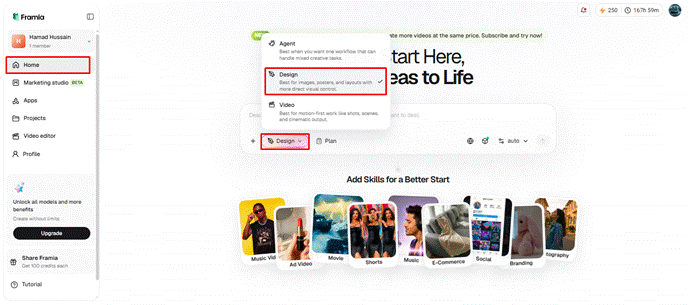
1. First, you need to sign up for Framia Pro. Next, go to the “Home” tab present in the left vertical menu bar.
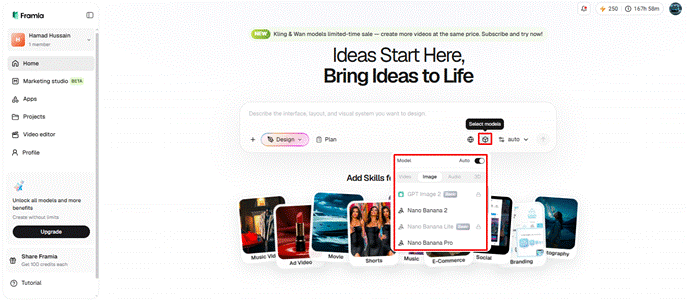
2. Later, click on “Design” from the drop-down menu option present in the bottom-left corner of the dialogue box.
3. Next, choose the model that best fits your anime creation needs.
4. Under the “Select models” menu, choose the “Image” option.
5. You can select from a range of models like “Seedream”, “GPT”, “Nanobanana”, “Flux Max” or “Qwen”.
Step 2: Add your photo and create your anime image
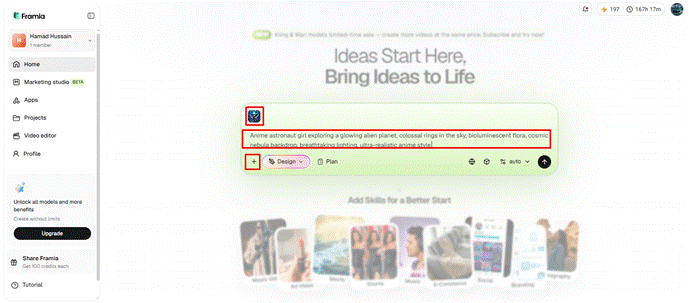
1. Now click on the “+” tab and choose a photo from your device to provide as a reference.
2. Next, in the dialogue box, enter the text prompt and clearly explain the anime style and final appearance you want.
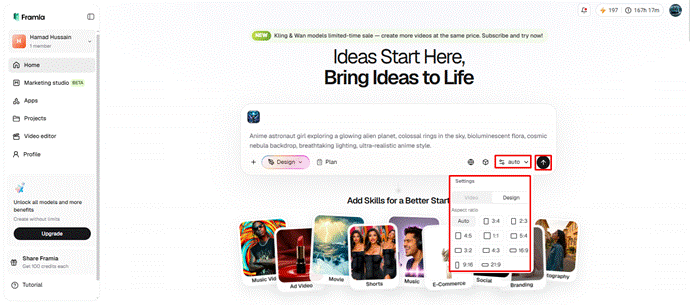
3. Later, select the aspect ratio from the “Settings” tab.
4. Finally, click the “Generate” tab to begin photo-to-video creation.
Step 3: Make quick edits and download instantly
1. You can “Preview” your image. If you want to edit your image further, you can do so either in the storyboard or via chat.
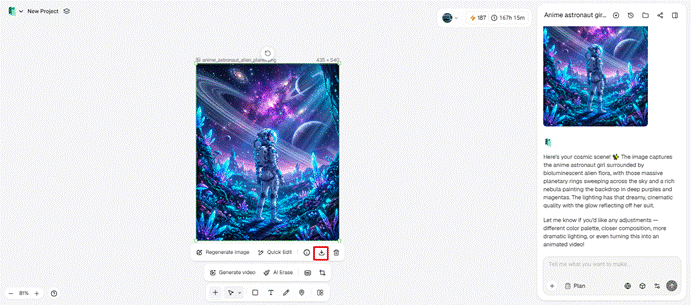
2. You can “Quick Edit”, “Regenerate image”, or use “AI Erase”, etc.
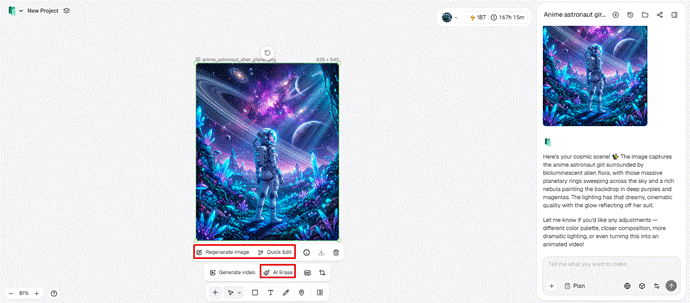
3. Once satisfied, click on the “Download” tab present on the menu below the video to save the file to your local device.
AI Features That Improve Workflow Flexibility
The more flexible the workflow, the more useful it is in cases where creative ideas change during production. Framia Pro enables conversational editing, which can be done by simple written instructions for artwork adjustments rather than complicated editing procedures. Storyboard changes ensure continuity of visuals and improve sequences of the story. AI Erase eliminates unwanted elements without compromising the overall image quality. Quick Edit reduces time spent on minor improvements, while Regeneration provides new visual options with the same prompts. Images can be prepared for motion, for subsequent animation workflows. The built-in anime generator tools make experimentation easy, allowing for multiple iterations of improvement without having to start over on projects.
Ways Framia Pro Speeds Up Anime Production
Several workflow advantages reduce production time while preserving creative quality.
- Several AI models align with various creative goals, offering optimized content production.
- Manual repetitive editing is eliminated with the use of simple natural language instructions in conversational editing.
- Built-in creative workspace organizes projects without having to move back and forth between different software platforms.
- Polished anime artwork is produced in just a few seconds by fast image generation.
- Completed artwork can be instantly downloaded, ready for publishing or further editing.
End-to-End Creative Workflow Management for Marketing Projects
Framia Pro Canvas takes creativity beyond image creation with an intelligent marketing workspace. Simple written goals become efficient creative task workflows automatically. It prepares content focused on brand and creates images for various publishing formats, as well as advanced image and video content creation through multiple leading AI technologies. Voice narration, background music, and visual production stay tied within a single environment until an integrated editing system stitches all the pieces together into a perfect downloadable project. This consolidated approach simplifies things and enables the streamlined marketing production workflow.
Maximizing Productivity with Framia Pro’s Unified AI Platform
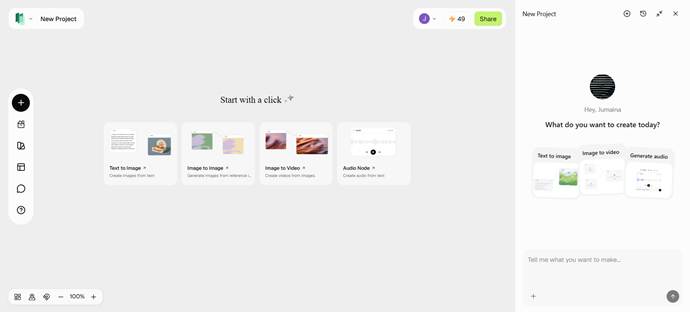
Productivity in creativity increases when the various production phases are not separated in different environments. Framia Pro is an all-in-one creative platform which integrates image generation, animation support, editing and project organization. Consistent characters ensure that familiar designs carry over to different scenes and campaigns. Iterative AI enhancements foster experimentation without the need to repeat workflows. Multiple AI models support, giving chances to compare and optimize art direction efficiently. Structured project management also helps to minimize interruptions, enabling creators to concentrate on storytelling, design quality, and production consistency throughout the process from start to finish export.
Also Read: How to Draw an Anime Dog?
Conclusion
Efficient processing, flexible editing, and organized workflows all contribute to making fast anime creation more practical. Quality downloads, consistent character design and streamlined project management help to make creative production simple without compromising on professional standards. Framia Pro brings together image creation and editing, animation support and workflow organization in a single ecosystem. This comprehensive workflow guides creators in organizing their projects efficiently and turning ideas into stunning anime art that can be readily adopted.


About the Author